

Hot temperatures, cool discounts.
Save up to 85%

Systweak Systweak PDF Editor Pro⁠

Edit, Convert & Secure PDFs – Smarter Than Ever

Only
US$45
US$100
−55%
Customer ratings for Systweak PDF Editor Pro
5 stars
32
(59,3%)
4 stars
9
(16,7%)
3 stars
4
(7,4%)
2 stars
1
(1,9%)
1 star
8
(14,8%)
Ratings by verified customers since 06/04/26
Real opinions matter!

Only customers who have purchased or registered a specific product can rate that product.

This way you can be certain that all opinions are genuine and verified.
Back
Systweak PDF Editor Pro
Show more products in Productivity

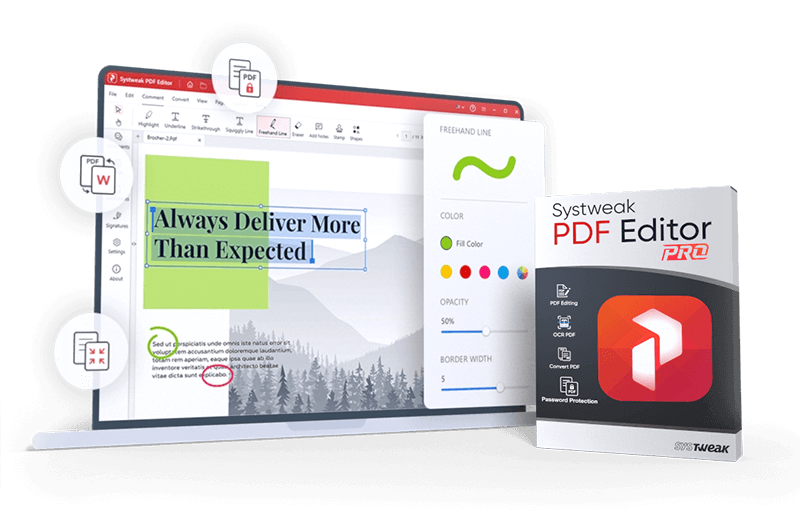
Systweak PDF Editor Pro – The All-in-One PDF Solution

With Systweak PDF Editor Pro, you get a powerful PDF software that goes far beyond simply viewing or printing documents. Whether you need to create, edit, scan, or securely share PDFs, this editor combines all essential features into one intuitive program. Edit text and images directly in PDFs, rearrange and merge pages, compress large files, or convert PDFs into formats like Word, Excel, or PowerPoint. The Pro version provides advanced tools that make document management more productive and professional.

Powerful Features for Every PDF Workflow

Systweak PDF Editor Pro offers a wide range of tools to manage and edit PDFs efficiently:
  • Edit & Create: Modify text, images, and pages or create entirely new PDFs.
  • Convert: Transform PDFs into Word, Excel, PowerPoint, image formats, or vice versa.
  • Sign & Secure: Add digital signatures and protect files with passwords or permissions.
  • Compress & Optimize: Reduce file sizes without losing quality—ideal for email or online sharing.
  • Batch Processing: Edit, convert, compress, or secure multiple documents at once.
  • OCR Functionality: Make scanned PDFs searchable and editable, perfect for digitized archives.
  • Advanced Tools: Add page numbers, repair PDFs, or insert Bates numbers for legal or administrative work.
With these capabilities, Systweak PDF Editor Pro replaces multiple separate tools and makes your daily PDF tasks faster, simpler, and more intuitive.

Efficient, Flexible & Secure – Perfect for Work, School, and Everyday Use

Whether for professional or personal use, Systweak PDF Editor Pro adapts to your workflow: read, edit, compress, sign, and prepare PDFs for print or sharing. Advanced security tools ensure that sensitive data remains protected. OCR support allows you to search and edit scanned documents instantly, saving time and boosting productivity. Its intuitive interface makes getting started simple while still providing the depth and flexibility needed for more complex tasks. This ensures full control over your documents without the need for additional software.

Conclusion: Your Documents. More Than Just Viewed.

Systweak PDF Editor Pro is a complete, powerful PDF toolkit that goes far beyond basic viewing features. From editing and conversion to security, it covers all your document needs—making your work smarter, faster, and more secure. Get started today and experience how effortless professional PDF management can be.

What customers think about Systweak PDF Editor Pro

Overall rating
4,0
from 54 customer reviews
5 stars
32
(59,3%)
4 stars
9
(16,7%)
3 stars
4
(7,4%)
2 stars
1
(1,9%)
1 star
8
(14,8%)
Ratings by verified customers since 06/04/26
Real opinions matter!

Only customers who have purchased or registered a specific product can rate that product.

This way you can be certain that all opinions are genuine and verified.

  • Skytweak PDF editor Pro is what it says it is and easier to use than Adobe Acrobat

    After I bought Ashampoo PDF-Pro5, I was disappointed that it lacked file conversion utility. Now, I bought Skytweak-PDF-editor Pro which offers file conversion, especially from PDF to Excel. It worked very well without losing page layout. The numbers were in the same column and fully useable for other calculations. One drawback is that it took much longer time to download and install the app and that the brochure did not mention if the purchase was one time use or subscription. The price of $30 for 3 devices is very good. The software layout is excellent. I can use this app to replace Adobe Acrobat PDF as the menu is well arranged intuitively.

    Helpful?
  • best PDF editor miglior editor PDF

    In my opinion, the software is excellent, intuitive, and hassle-free. The price of 30 euros for a lifetime license for three PCs is great. Highly recommended!

    Per me il software eccellente, intuitivo e senza problemi. Ottimo il prezzo di 30 euro per la licenza a vita per tre pc. Consigliatissimo!

    This review has been automatically translated.
    Helpful?
  • The program meets my expectations Das Programm deckt meine Erwartungen ab

    The five stars were awarded on the condition that this is indeed a lifetime license with corresponding updates and upgrades, since Systweak has a different understanding of what constitutes a lifetime license in its own terms of service.

    I’ve tested almost all the features, especially the OCR functions, including scanning. Both methods—via the scanner software’s interface or via Systweak—produce very similar results for documents.

    One advantage is that I have all the features I primarily use in a single program.

    I find the very pale interface to be a drawback. I would prefer bolder or darker settings; at the very least, there should be an option to choose from.

    Die fünf Sterne wurden unter der Voraussetzung, dass es sich tatsächlich um eine Lifetime Lizenz mit entsprechenden Updates und Upgrades handelt, vergeben, da Systweak in seinen eigenen Terms ein anderes Verständnis von einer Dauerlizenz hat.

    Ich habe fast alle Funktionen getestet, insbesondere auch die OCR Funktionen inklusive des Scannens. Beide Varianten, über die Schnittstelle der Scannersoftware oder über Systweak weisen bei Dokumenten sehr ähnliche Ergebnisse auf.

    Vorteilhaft ist, dass ich alle Funktionen mit denen ich vorrangig arbeite, in einem Programm habe.

    Als nicht vorteilhaft empfinde ich das sehr blasse Erscheinungsbild. Kräftigere oder auch dunklere Settings würden mir besser gefallen, zumindest sollte diesbezüglich es eine Wahlmöglichkeit geben.

    This review has been automatically translated.
    Helpful?
  • Very comprehensive and effective Très complet et efficace

    Easy to use for people familiar with this type of software

    It’s comprehensive, with high-quality OCR recognition; it handles documents that are photographed crooked, at an angle, or in poor lighting well.

    The only downside I found is that you have to reset the language to French for each OCR scan; this doesn’t seem to be configurable by default.

    Simple d'emploi pour les gens habitués à ce genre de logiciels

    Il est complet, reconnaissance OCR de qualité, traite bien des documents photographiés de travers, en biais et mal éclairés.

    Seul bémol trouvé, il faut remettre la langue en français à chaque OCR, ce n'est pas à priori paramétrable par défaut.

    This review has been automatically translated.
    Helpful?
  • Useful For Me

    I use this for adding separate PDF files together and sometimes editing the joined files.

    Easy to use - it did take me a while to understand it - but most software does.

    Very good and useful

    Helpful?
Windows and the Windows logo are trademarks of the Microsoft group of companies.
End User License Agreement

More top products from Ashampoo: No PC should be without them!

About Ashampoo
Users
22+ million
Downloads
500.000+ per month
World-wide
In over 160 countries
Experience
Over 25 years