




CODIJY Colorizer PRO
Werde zum Meister der Farbkolorierung!
| 5 Sterne |
|
39 |
(53.4%)
|
| 4 Sterne |
|
12 |
(16.4%)
|
| 3 Sterne |
|
10 |
(13.7%)
|
| 2 Sterne |
|
5 |
(6.8%)
|
| 1 Stern |
|
7 |
(9.6%)
|
Bei uns können nur Kunden, die ein Produkt tatsächlich gekauft oder registriert haben, eine Bewertung über ihren Kundenaccount abgeben.
So kannst Du sicher sein, dass alle Meinungen echt und verifiziert sind.
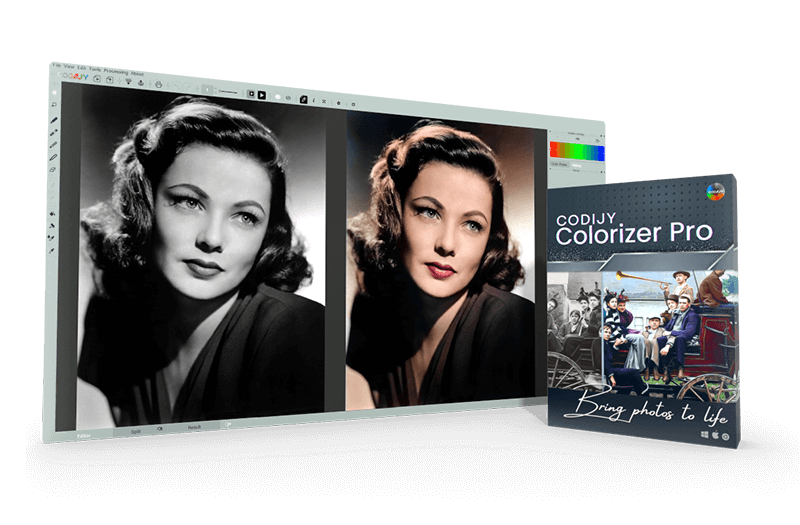
Werde zum Meister der Farbkolorierung!
Willst Du Deine Fotos mit Leben erfüllen und ihnen einen Hauch von Farbe verleihen? Mit CODIJY Colorizer Pro hast Du das perfekte Werkzeug dafür. Tauche ein in die faszinierende Welt der Farbkolorierung und entdecke die grenzenlosen Möglichkeiten, die dieses Programm bietet.
CODIJY Colorizer Pro bietet Dir nicht nur eine einfache und effektive Möglichkeit, Deine Fotos zu kolorieren, sondern auch leistungsstarke Werkzeuge, um Deine kreativen Visionen zu verwirklichen. Die hochentwickelten Algorithmen und Funktionen ermöglichen es Dir, jedes Detail Deiner Fotos mit präziser Genauigkeit zu bearbeiten.
Vorteile von CODIJY Colorizer Pro:
Mit CODIJY Colorizer Pro kannst Du Deine Schwarz-Weiß-Fotos in farbenfrohe Meisterwerke verwandeln. Ganz gleich, ob Du ein erfahrener Fotograf, ein leidenschaftlicher Künstler oder einfach nur ein Liebhaber der Bildbearbeitung bist, dieses Programm ist Dein idealer Begleiter.
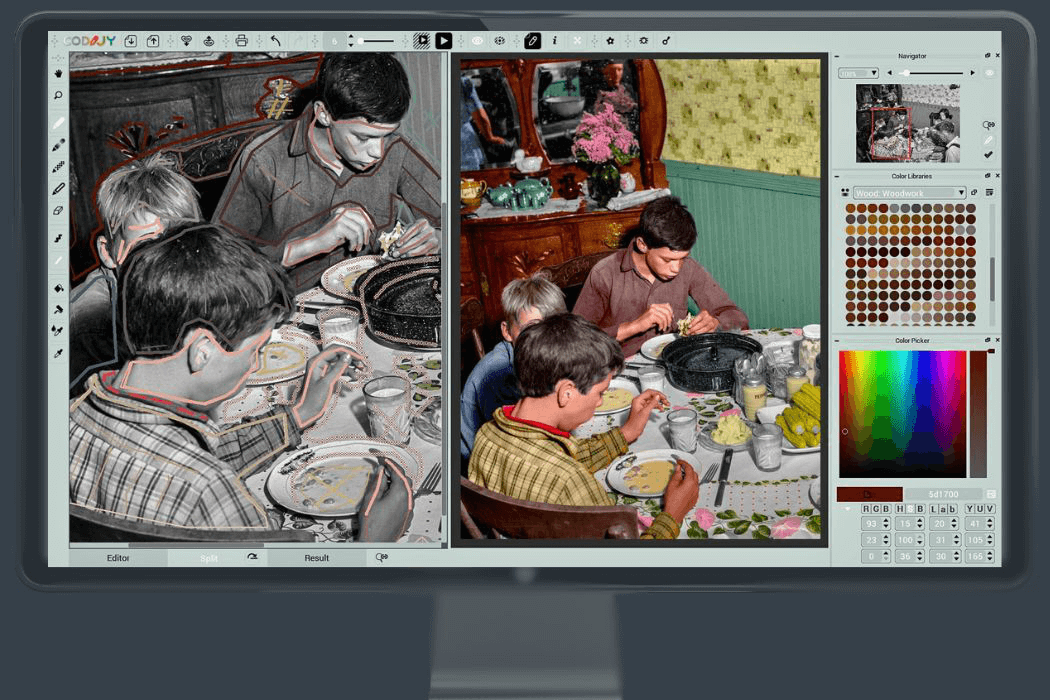
Dank seiner intuitiven Bedienung und fortschrittlichen Funktionen kannst Du mühelos Farben in Echtzeit hinzufügen und anpassen. Wähle aus einer Vielzahl von Farbpaletten und Bibliotheken oder erstelle Deine eigenen individuellen Farbschemata.
So bewerten Kunden CODIJY Colorizer PRO
Bei uns können nur Kunden, die ein Produkt tatsächlich gekauft oder registriert haben, eine Bewertung über ihren Kundenaccount abgeben.
So kannst Du sicher sein, dass alle Meinungen echt und verifiziert sind.
-
John ForsytheCODIJY Colorizer Pro erweist sich als intuitives und äußerst effektives Programm, um alte Erinnerungen wieder zum Leben zu erwecken. CODIJY Colorizer Pro proves to be an intuitive and highly effective studio for bringing old memories back to life.
Für die meisten von uns beginnt das Schwelgen in Erinnerungen oft damit, alte Fotos zu finden und über die Momente nachzudenken, die darauf festgehalten sind. Für viele existieren diese Fotos nur in Schwarz-Weiß. Da stellt sich natürlich die Frage: Was wäre, wenn man sie mit realistischen Farben wiederherstellen könnte? CODIJY Colorizer Pro zeigt, dass das nicht nur möglich, sondern auch bemerkenswert einfach ist.
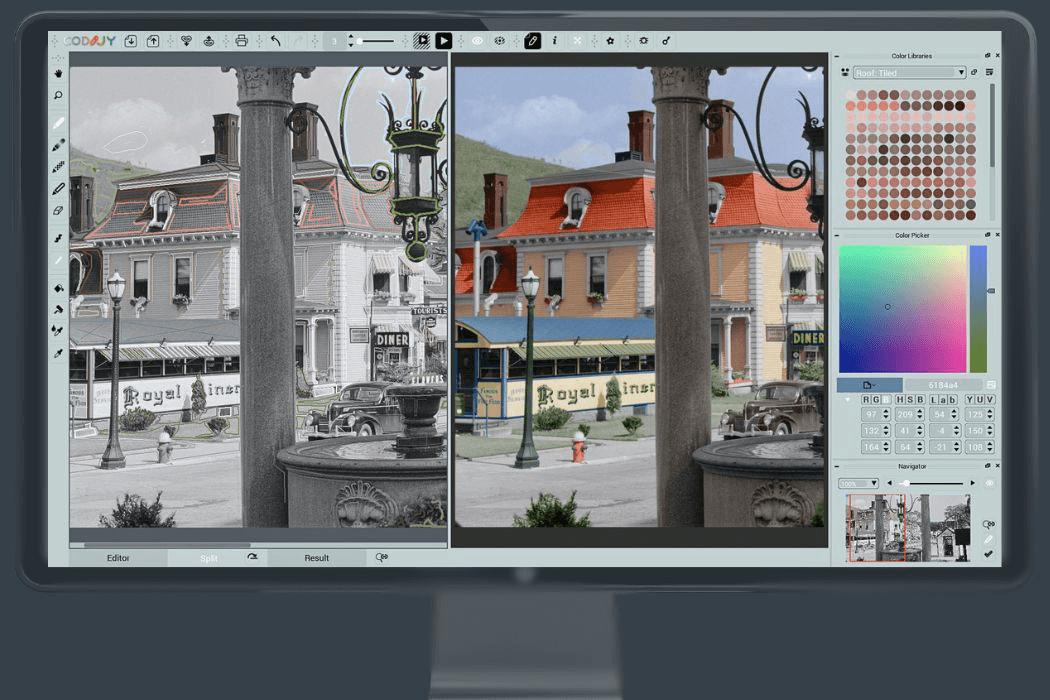
Je nach Projekt bietet die Software eine breite Palette an Werkzeugen, die den Kolorierungsprozess unterstützen. Du kannst mit Verlaufseinstellungen, einem präzisen Farbwähler und kuratierten Farbbibliotheken arbeiten, wenn nur bestimmte Farbtöne benötigt werden.
Das Werkzeugset auf der linken Seite der Benutzeroberfläche leitet den zentralen Arbeitsablauf beim Einfärben. Mit dem Hand-Werkzeug kannst du das Bild neu positionieren, während das Zoom-Werkzeug dir hilft, feine Details zu untersuchen. Es stehen vier Stift-Werkzeuge zur Verfügung – eines zum Auftragen von Farbe, eines zum Erstellen von Farbverläufen, eines zum Schützen bestehender Farben und eines zum Entfernen von Farbe aus ausgewählten Bereichen.
Das Auftragen von Farbe ist ganz einfach: Zieh den Stift einfach über die Bereiche, die du einfärben möchtest. Die Präzision ist beeindruckend. Im Split-View-Modus am unteren Bildschirmrand kannst du genau sehen, wie sich jeder Strich auf das Endergebnis auswirkt.
Die Werkzeuge am oberen Rand übernehmen die restlichen Schritte, sobald du mit dem Einfärben fertig bist. Du kannst das Bild bearbeiten, um die endgültige Version zu erstellen, entweder das fertige Foto oder die von dir erstellte Maske speichern und das Ergebnis bei Bedarf sogar direkt ausdrucken.
Letztendlich erweist sich CODIJY Colorizer Pro als intuitives und äußerst effektives Bearbeitungsprogramm, um alte Erinnerungen wieder zum Leben zu erwecken. Es bietet eine gut durchdachte Balance aus professionellen Werkzeugen und benutzerfreundlichem Design und liefert ein hervorragendes Gesamterlebnis für alle, die alte Fotos restaurieren und aufwerten möchten.
For most of us, revisiting memories often begins with finding old photographs and reflecting on the moments they captured. For many, those photographs exist only in black and white. The question naturally arises: what if you could restore them with realistic color? CODIJY Colorizer Pro demonstrates that this is not only possible, but remarkably accessible.
Depending on the project, the software provides a wide range of tools to support the coloring process. You can work with gradient settings, a precise color picker, and curated color libraries for situations where only specific shades are needed.
The toolset on the left side of the interface guides the core coloring workflow. The hand tool allows you to reposition the image, while the zoom tool helps you examine fine details. Four pen tools are available—one for applying color, one for creating gradients, one for protecting existing colors, and one for removing color from selected areas.
Applying color is straightforward: simply drag the pen across the areas you want to tint. The level of precision is impressive. The split‑view mode, located at the bottom of the screen, lets you see exactly how each stroke influences the final result.
The tools along the top handle the remaining steps once your coloring work is complete. You can process the image to generate the final version, save either the finished photo or the mask you created, and even print the result directly if needed.
In the end, CODIJY Colorizer Pro proves to be an intuitive and highly effective studio for bringing old memories back to life. It offers a thoughtful balance of professional‑grade tools and user‑friendly design, delivering an excellent overall experience for anyone looking to restore and enhance vintage photographs.
Diese Rezension wurde automatisch übersetzt.Hilfreich? -
Phillip ZubrodFamilienfotos Family photos
Familienfotos werden lebendig.
Family photos come alive.
Diese Rezension wurde automatisch übersetzt.Hilfreich? -
rolf ochssnercolorizer pro
ich habe noch nie verwendet, weiß garnicht wie es geht
hilfe telefon 06241 25098
Hilfreich? -
DonytekEigentlich sollte sie einfach zu bedienen sein... It was supposed to be easy to use...
Ich habe es nie geschafft, mit dieser App ein Schwarz-Weiß-Foto einzufärben.
I never could get this app to colorize a b&w photo.
Diese Rezension wurde automatisch übersetzt.Ashampoo SupportTeam AshampooFür etwaige Fragen oder Schwierigkeiten können Sie sich gerne an unseren Kundensupport wenden. Speziell für dieses Produkt stellt Codijy umfangreiche Tutorials und Unterstützungsmaterialien zur Verfügung, die Sie bei den ersten Schritten der Produktnutzung begleiten.
If you have any questions or encounter any difficulties, please feel free to contact our customer support. Codijy provides extensive tutorials and support materials specifically for this product to help you get started.
Hilfreich?
Mehr Ashampoo Top-Produkte, die auf jeden Rechner gehören




Bildbearbeitung, Fotoverwaltung und Bildbetrachter in einem Programm!