




Abelssoft SSD Fresh 2026
Maximize your SSD's lifespan!
| 5 stars |
|
197 |
(65.9%)
|
| 4 stars |
|
57 |
(19.1%)
|
| 3 stars |
|
21 |
(7.0%)
|
| 2 stars |
|
8 |
(2.7%)
|
| 1 star |
|
16 |
(5.4%)
|
Only customers who have purchased or registered a specific product can rate that product.
This way you can be certain that all opinions are genuine and verified.
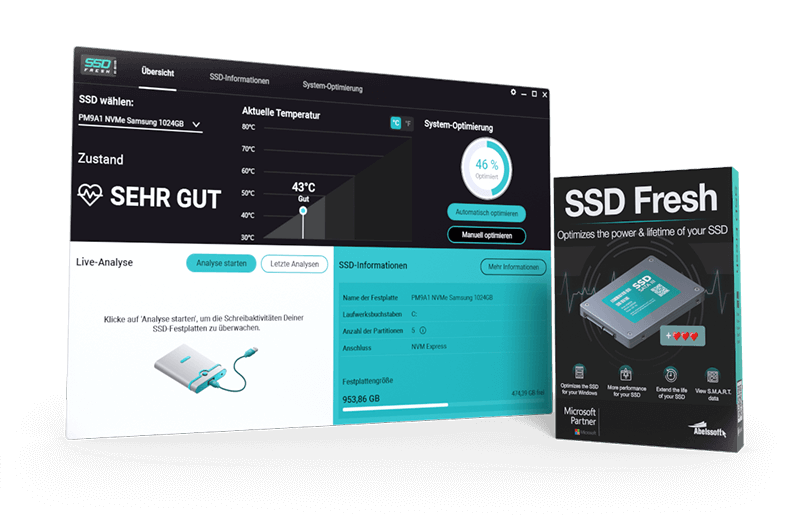
SSD Fresh 2026 – More Speed. Longer Life.
SSD Fresh brings powerful new tools to improve your SSD's performance and durability. The redesigned interface makes optimization easier than ever, while the new sleep mode deactivation reduces background write operations. With real-time activity monitoring, you can now see exactly which processes are putting load on your SSD. Together, these new features help your drive run faster, cooler, and last longer.
New Features in SSD Fresh 2026- Redesigned user interface – cleaner, more intuitive, and easier to navigate
- Disable hibernation – reduces unnecessary write operations and helps extend SSD lifespan
- Live activity monitoring – real-time analysis shows which processes are accessing your SSD
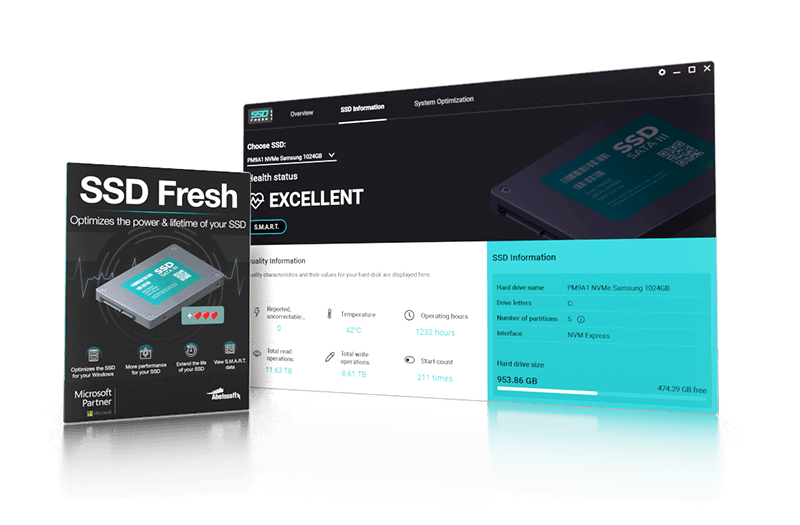
- Increases the lifespan of SSD storage drives
- Display information about the drives
- Turn off unnecessary hard disk services
- Data optimization for faster program access times
- NEW: Revised program interface
- “Disable hibernation” function significantly reduces unnecessary accesses
What is the condition of my SSD? SSD Fresh shows you in real time!
SSD Fresh shows you the condition of your SSDs in real time and informs you about temperature, number of write operations and more. With this clearly presented information, you can react as soon as the condition of your SSD hard drives becomes critical and measures need to be taken.
Significantly extend the life of your SSD — simply with a mouse click
Superfluous read and write accesses drastically reduce the lifespan of SSDs. With SSD Fresh, you can optimize the system settings simply with a mouse click or carry out more detailed optimizations manually. In this way, you deactivate unnecessary services and accesses and take perfect action against SSD hard disk wear.
S.M.A.R.T. data: All relevant information about my SSD
Reading out the S.M.A.R.T. data provides you with vital information about your SSDs. This includes read error rate, number of write operations, number of operating hours and more. With this knowledge, errors can be detected at an early stage to prevent sudden hard drive crashes.
What customers think about SSD Fresh 2026
Only customers who have purchased or registered a specific product can rate that product.
This way you can be certain that all opinions are genuine and verified.
-
ingo silbersuper super
This programme configures everything on the SSD; you hardly need to do anything and it works a treat.
dieses programm stellt alles auf der ssd festplatte ein man brauch kaum was machen und es läuft top.
This review has been automatically translated.Helpful? -
OlivierEasy to use Utilisation facile
You need to identify any traditional hard drives (HDDs), as the software detects them and you must uncheck those that are not SSDs. In my case, it turned out that the main SSD was a WD and that I had another WD connected via USB, which is an HDD. As they have unidentifiable names, you need to unplug the USB HDD to identify it and check the name of the SSD via the Task Manager and Performance Monitor.
Il faut identiffier les éventuels disques durs classiques (HDD), car le logiciel les détecte et il faut décocher ceux qui ne dont pas des SSD. Dans mon cas il se trouve que le SSD principal était un WD et que j'avais un autre WD en usb qui est un HDD. Comme ils ont des noms non identifiables, il faut débrancher le HDD usb pour l'identifier et vérifier le nom du SSD via le gestionnaire des tâches et performances.
This review has been automatically translated.Helpful? -
Joachim MeitznerA lifesaver Retter in der Not
It helped me to preserve important data records.
Hat mir bei der Erhaltung wichtiger Datensätze geholfen.
This review has been automatically translated.Helpful? -
Garry LawsonSSD Fresh SSD Fresh
Great program for speeding up you SSD , improve my speed by over 90% from 25% , a good investment . One of the best programs out and faster .
Great program for speeding up you SSD , improve my speed by over 90% from 25% , a good investment . One of the best programs out and faster .
This review has been automatically translated.Helpful? -
Mariusz RutkowskiExcellent Super
I recommend it
Polecam
This review has been automatically translated.Helpful?
More top products from Ashampoo: No PC should be without them!




Enhanced installation monitoring, precision, and compatibility for your System!