

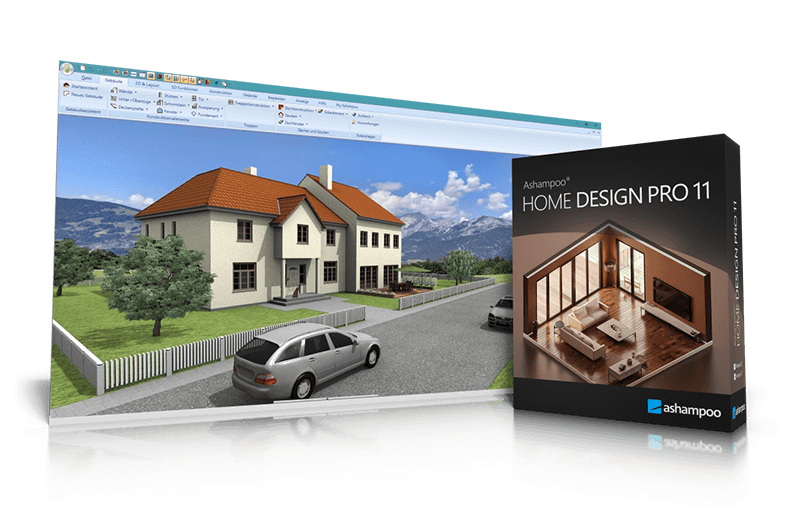
Ashampoo® Home Design Pro 11
Professional CAD Solution – Precise & Intuitive
for free now!
| 5 stars |
|
46 |
(62.2%)
|
| 4 stars |
|
18 |
(24.3%)
|
| 3 stars |
|
4 |
(5.4%)
|
| 2 stars |
|
1 |
(1.4%)
|
| 1 star |
|
5 |
(6.8%)
|
Only customers who have purchased or registered a specific product can rate that product.
This way you can be certain that all opinions are genuine and verified.
Professional home planning with advanced construction and layout features
Ashampoo Home Design Pro 11 is a powerful 3D home design software solution for precise planning of buildings, interiors, and roofs. Create floor plans, design rooms, integrate solar systems, and experience your project in a realistic 3D view. Automatic calculations for lengths, areas, angles, and volumes ensure accurate results without complicated math. Pro 11 truly stands out when designs evolve into complete plan documents and technically sophisticated constructions.
- Access to multiple new objects through Google Sketchup and Collada model import
- Precise 3D previews for every planning step
- Plan roof-mounted photovoltaic installations easily
- Over 380 new symbols for electrical, gas, water and security appliances
- 3D preview with furniture, light and surroundings
- New numeric edit tools for walls, windows, and doors
- Additional window and door parts, shutter boxes, blinds, borders
- Plan Layout with multiple views on a single sheet
- Scaled plan layouts with PDF output
- 2D drawing functions for adding drawing details and enhancing floor plans
- Insert scanned floor plans (JPG, PNG) as images and use them as a blueprint to trace your 3D building model
- Extended 2D drawing functions with custom line types and hatching
- Create and edit custom 2D symbols
- Combinable roof extensions and roof openings
- Extended roof variants including hall roofs
- Integrated 3D Converter with material and texture editing
Extended 2D drawing functions for precise detail work
Home Design Pro 11 includes comprehensive 2D drawing tools for detailed plan development. Create custom line types, use extended fill properties and nuanced hatching—for example, to represent materials or wall structures. You can create your own 2D symbols and save them to the catalog. Existing symbols can be customized—ideal for individual title blocks or project-specific plan information.
With Home Design, I can plan my entire home right from my desk—moving furniture around, trying new layouts, or redecorating. Sure, like any CAD program, there's a minor learning curve, but once you see your project in 3D, it’s totally worth it.

More than 280 new 3D objects – flexible and scalable
The 3D object catalog has been substantially expanded. More than 280 new models are now available as fully scalable objects. Materials and textures can be individually customized, providing maximum design flexibility. The update also includes current photovoltaic modules and preconfigured PV assemblies for balcony power systems. The result is greater realism in visualization and increased precision in detailed planning.
What customers think about Home Design Pro 11
Only customers who have purchased or registered a specific product can rate that product.
This way you can be certain that all opinions are genuine and verified.
-
A.D.At first glance, it looks pretty good—but it has some issues auf den ersten Blick ganz gut - aber mit Problemen
Here’s what I can say after 1–2 hours of use.
The program is easy to use, but you have to “tinker around” a bit until you get the hang of it and understand its structure.
One drawback (for me, at least) is definitely that the program won’t launch on Windows 11 if the Windows security feature “Smart App Control” is turned on or enabled.
What worked... was disabling Smart App Control before launching the program and then re-enabling it afterward... it’s a bit of a hassle—but it works (so far).
Was ich so nach 1-2 Stunden sagen kann.
Das Programm ist einfach zu bedienen, man muss aber ein wenig "rumprobieren" bis man einen Überblick hat und die Struktur versteht.
Ein Manko ist (für mich) definitiv, dass sich das Programm unter Windows 11 nicht starten lässt, wenn die Windows-Sicherheitsfunktion "Smart App Control" eingeschaltet/ aktiviert ist.
Was funktioniert hat ... vorm Programmstart die Smart App Control deaktivieren/ abschalten und danach wieder einschalten ... ist ein wenig umständlich - funktioniert aber (bis jetzt).
This review has been automatically translated.Helpful? -
GUSTAVO ALVAREZNot bad, needs more work
The soft has an enormous potential, but there are some issues between 2D and 3D views, ghost walls appeared. I have starting to work with it and layers are not very intuitive. Documentation points to a different named app, but the videos are very useful.
Helpful?
More top products from Ashampoo: No PC should be without them!