




CODIJY Colorizer PRO
Renklendirme ustası olun!
| 5 yıldız |
|
39 |
(%53,4)
|
| 4 yıldız |
|
12 |
(%16,4)
|
| 3 yıldız |
|
10 |
(%13,7)
|
| 2 yıldız |
|
5 |
(%6,8)
|
| 1 yıldız |
|
7 |
(%9,6)
|
Yalnızca belirli bir ürünü satın alan veya kaydetmiş müşteriler bu ürünü derecelendirebilir.
Bu şekilde tüm görüşlerin gerçek ve doğrulanmış olduğundan emin olabilirsiniz.
Renklendirme ustası olun!
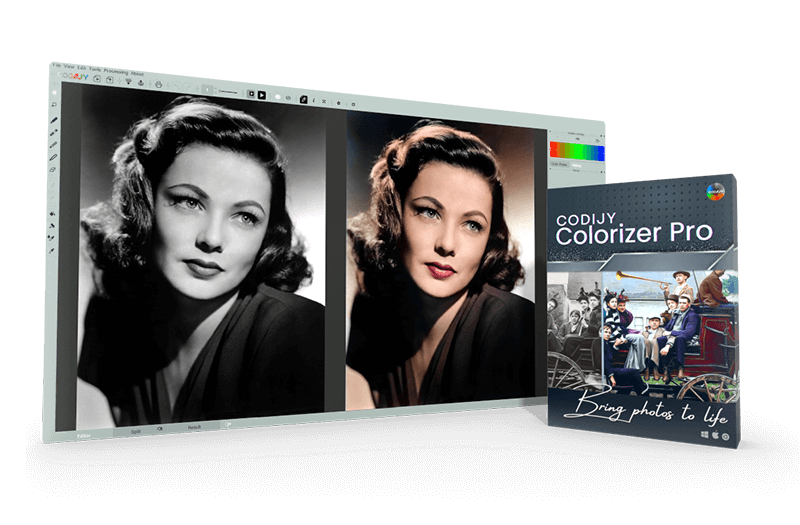
Fotoğraflarınıza hayat vermek ve onlara renk katmak ister misiniz? CODIJY Colorizer Pro ile bunun için mükemmel bir araca sahipsiniz. Kendinizi renklendirmenin büyüleyici dünyasına bırakın ve bu programın sunduğu sınırsız olanakları keşfedin.
CODIJY Colorizer Pro, fotoğraflarınızı renklendirmenin basit ve etkili bir yolunun yanı sıra yaratıcı vizyonlarınızı hayata geçirecek güçlü araçlar da sağlar. Gelişmiş algoritmalar ve özellikler, fotoğraflarınızın her ayrıntısını hassas bir doğrulukla düzenlemenize olanak tanır.
CODIJY Colorizer Pro'nun Avantajları:
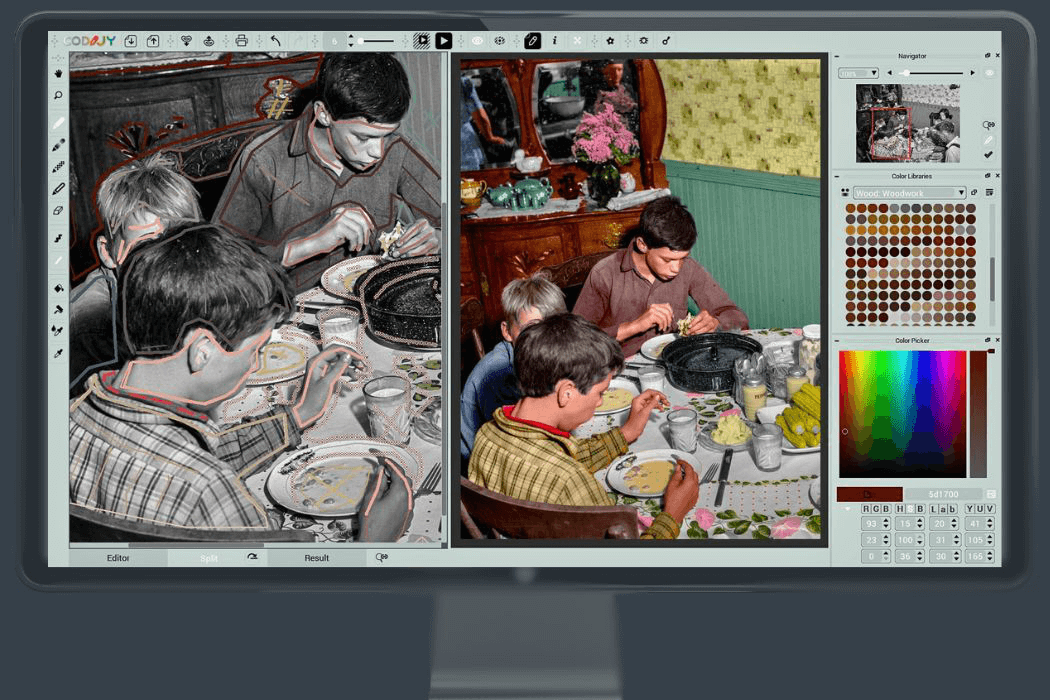
CODIJY Colorizer Pro ile siyah beyaz fotoğraflarınızı rengarenk şaheserlere dönüştürebilirsiniz. İster deneyimli bir fotoğrafçı, ister tutkulu bir sanatçı, ister sadece resim düzenlemeyi seven biri olun, bu program ideal arkadaşınızdır.
Sezgisel kullanımı ve gelişmiş özellikleri sayesinde renkleri gerçek zamanlı olarak zahmetsizce ekleyebilir ve ayarlayabilirsiniz. Çeşitli renk paletleri ve kitaplıkları arasından seçim yapın veya kendi bireysel renk şemalarınızı oluşturun.
Müşteriler CODIJY Colorizer PRO hakkında ne düşünüyor
Yalnızca belirli bir ürünü satın alan veya kaydetmiş müşteriler bu ürünü derecelendirebilir.
Bu şekilde tüm görüşlerin gerçek ve doğrulanmış olduğundan emin olabilirsiniz.
-
John ForsytheCODIJY Colorizer Pro, eski anıları yeniden canlandırmak için sezgisel ve son derece etkili bir araç olduğunu kanıtlıyor. CODIJY Colorizer Pro proves to be an intuitive and highly effective studio for bringing old memories back to life.
Çoğumuz için anıları yeniden canlandırmak, genellikle eski fotoğrafları bulmak ve o anları düşünmekle başlar. Birçok kişi için bu fotoğraflar sadece siyah beyazdır. Doğal olarak şu soru akla gelir: Ya bu fotoğrafları gerçekçi renklerle geri getirebilseydiniz? CODIJY Colorizer Pro, bunun sadece mümkün değil, aynı zamanda son derece erişilebilir olduğunu da gösteriyor.
Projeye bağlı olarak, yazılım renklendirme sürecini desteklemek için geniş bir araç yelpazesi sunar. Gradyan ayarları, hassas bir renk seçici ve yalnızca belirli tonların gerekli olduğu durumlar için özenle seçilmiş renk kütüphaneleriyle çalışabilirsiniz.
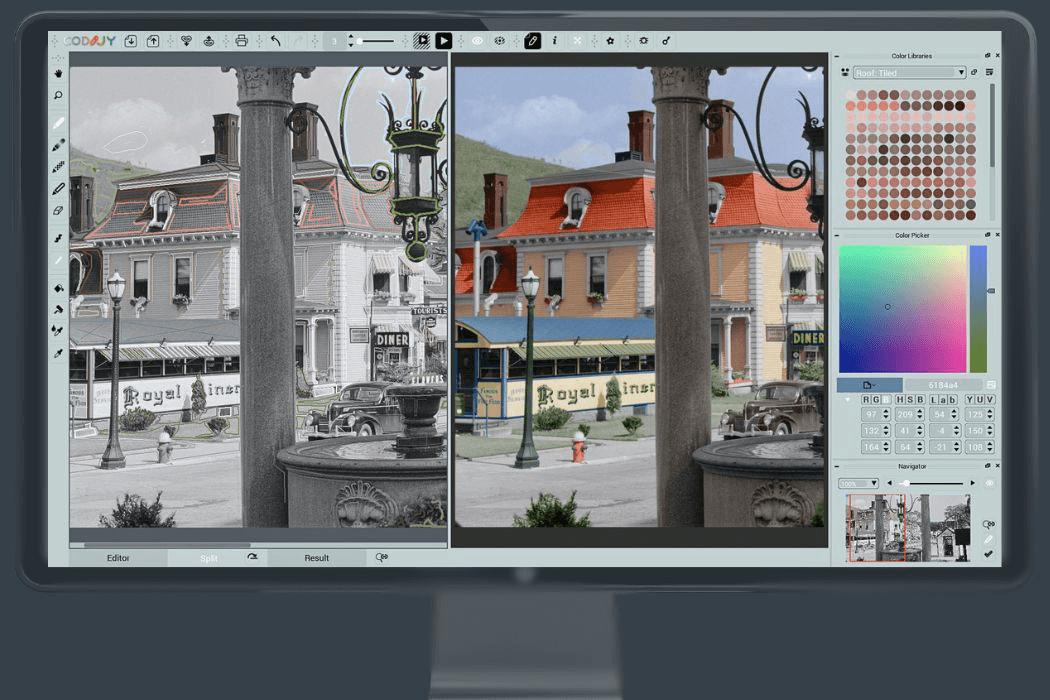
Arayüzün sol tarafındaki araç seti, temel renklendirme iş akışını yönlendirir. El aracı, görüntüyü yeniden konumlandırmanıza izin verirken, yakınlaştırma aracı ise ince ayrıntıları incelemenize yardımcı olur. Dört kalem aracı mevcuttur: biri renk uygulamak, biri gradyan oluşturmak, biri mevcut renkleri korumak ve biri de seçilen alanlardan rengi kaldırmak içindir.
Renk uygulamak oldukça basittir: kalemi renklendirmek istediğiniz alanların üzerinden sürüklemeniz yeterlidir. Hassasiyet seviyesi etkileyicidir. Ekranın alt kısmında bulunan bölünmüş görünüm modu, her bir vuruşun nihai sonucu nasıl etkilediğini tam olarak görmenizi sağlar.
Renklendirme işiniz bittiğinde, üst kısımdaki araçlar geri kalan adımları halleder. Görüntüyü işleyerek son halini oluşturabilir, bitmiş fotoğrafı veya oluşturduğunuz maskeyi kaydedebilir ve hatta gerekirse sonucu doğrudan yazdırabilirsiniz.
Sonuç olarak, CODIJY Colorizer Pro, eski anıları yeniden canlandırmak için sezgisel ve son derece etkili bir stüdyo olduğunu kanıtlıyor. Profesyonel düzeyde araçlar ile kullanıcı dostu tasarım arasında özenle kurulmuş bir denge sunarak, eski fotoğrafları restore etmek ve güzelleştirmek isteyen herkese mükemmel bir genel deneyim yaşatıyor.
For most of us, revisiting memories often begins with finding old photographs and reflecting on the moments they captured. For many, those photographs exist only in black and white. The question naturally arises: what if you could restore them with realistic color? CODIJY Colorizer Pro demonstrates that this is not only possible, but remarkably accessible.
Depending on the project, the software provides a wide range of tools to support the coloring process. You can work with gradient settings, a precise color picker, and curated color libraries for situations where only specific shades are needed.
The toolset on the left side of the interface guides the core coloring workflow. The hand tool allows you to reposition the image, while the zoom tool helps you examine fine details. Four pen tools are available—one for applying color, one for creating gradients, one for protecting existing colors, and one for removing color from selected areas.
Applying color is straightforward: simply drag the pen across the areas you want to tint. The level of precision is impressive. The split‑view mode, located at the bottom of the screen, lets you see exactly how each stroke influences the final result.
The tools along the top handle the remaining steps once your coloring work is complete. You can process the image to generate the final version, save either the finished photo or the mask you created, and even print the result directly if needed.
In the end, CODIJY Colorizer Pro proves to be an intuitive and highly effective studio for bringing old memories back to life. It offers a thoughtful balance of professional‑grade tools and user‑friendly design, delivering an excellent overall experience for anyone looking to restore and enhance vintage photographs.
Bu inceleme otomatik olarak çevrilmiştir.Faydalı mı? -
Phillip ZubrodAile fotoğrafları Family photos
Aile fotoğrafları canlanıyor.
Family photos come alive.
Bu inceleme otomatik olarak çevrilmiştir.Faydalı mı? -
rolf ochssnerRenklendirici Pro colorizer pro
Daha önce hiç kullanmadım, nasıl çalıştığını bile bilmiyorum
Yardım telefonu 06241 25098
ich habe noch nie verwendet, weiß garnicht wie es geht
hilfe telefon 06241 25098
Bu inceleme otomatik olarak çevrilmiştir.Faydalı mı? -
DonytekKullanımı kolay olması gerekiyordu... It was supposed to be easy to use...
Bu uygulamayı siyah-beyaz bir fotoğrafı renklendirmek için bir türlü kullanamadım.
I never could get this app to colorize a b&w photo.
Bu inceleme otomatik olarak çevrilmiştir.Ashampoo SupportTeam AshampooHerhangi bir sorunuz veya sorun yaşarsanız, müşteri destek ekibimizle iletişime geçebilirsiniz. Codijy, özellikle bu ürün için, ürünü kullanmaya başlarken size yol gösterecek kapsamlı eğitim kılavuzları ve destek materyalleri sunmaktadır.
If you have any questions or encounter any difficulties, please feel free to contact our customer support. Codijy provides extensive tutorials and support materials specifically for this product to help you get started.
Faydalı mı?
Ashampoo'dan en iyi diğer ürünler: Hiçbir PC onlarsız olmamalıdır!



Hepsi bir arada görüntü yöneticisi, düzenleyici ve görüntüleyici!