


Ashampoo® Photo Organizer Pro 26
The smart solution for growing photo collections
for free now!
| 5 stars |
|
256 |
(49.9%)
|
| 4 stars |
|
114 |
(22.2%)
|
| 3 stars |
|
59 |
(11.5%)
|
| 2 stars |
|
22 |
(4.3%)
|
| 1 star |
|
62 |
(12.1%)
|
Only customers who have purchased or registered a specific product can rate that product.
This way you can be certain that all opinions are genuine and verified.

More clarity, flexibility, and convenience for you
Ashampoo Photo Organizer Pro 26 is more versatile, faster, and flexible–with the features our users have been asking for! Managing large photo collections has never been easier. Check out the new classic folder tree view, WebDAV cloud integration, or fast batch processing for tags and find out how effortless professional photo organization can be today!
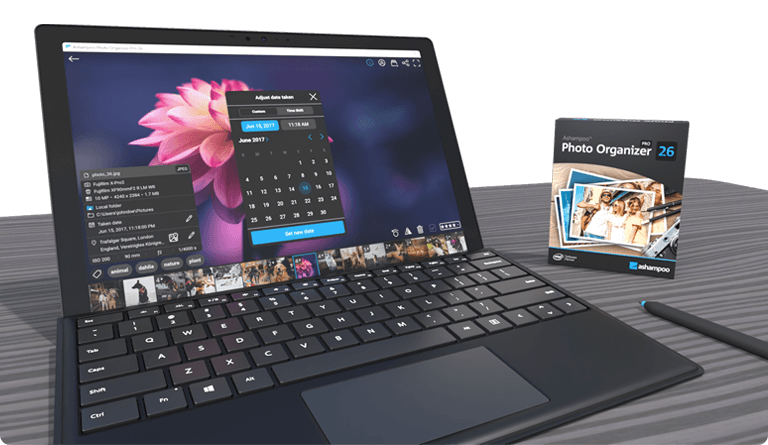
- WebDAV support
- Classic folder tree view
- Batch processing
- Easy photo import
- Automatic focus assessment of photos
- Automatic grouping of photo series
- Automatic search for top photos
- Fast photo culling
- Duplicate detection and removal
- Convenient batch renaming
- Extensive metadata support including XMP sidecars
- Smart albums with automatic sorting by location, camera, keywords, etc.
- Powerful search with numerous criteria
- Lossless rotation and mirroring of images
- Theater mode for uninterrupted full-screen enjoyment
- Tagging
- Cloud integration (OneDrive and Dropbox)
- Various storage locations in one overview
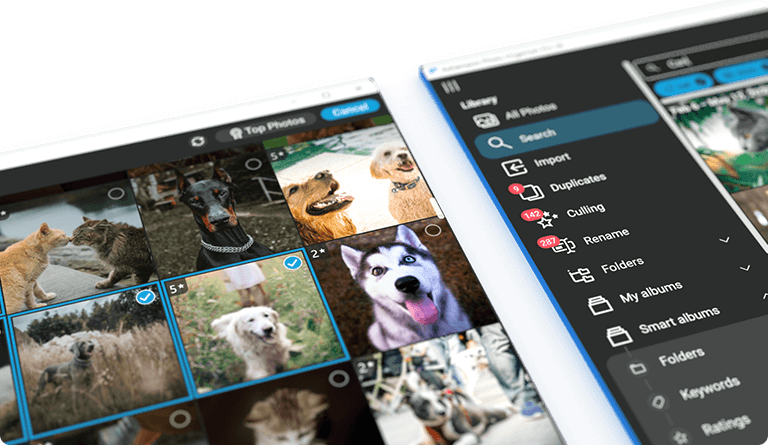
Better navigation with the new folder tree view
With the new folder tree view, you can now see your photos exactly as they're organized on your system, using a classic folder structure. Navigation becomes intuitive, and finding your images is easier than ever. Whether you're browsing project folders, vacation albums, or custom categories–just click through your familiar hierarchy and feel instantly at home. Perfect for anyone who values their personal organization system!
Access even more cloud services with WebDAV
You can now load your photos directly from cloud services that support WebDAV–including popular providers like Nextcloud, ownCloud, and pCloud. Seamlessly access images stored remotely and integrate self-hosted solutions into your workflow. Whether you’re grabbing vacation shots from your family’s Nextcloud or professional photos from your pCloud backup, Ashampoo Photo Organizer Pro brings everything together in one place, including local files, Dropbox, OneDrive, and WebDAV clouds!
Batch-edit tags and locations
Save even more time with the new batch processing! Apply tags or adjust photo locations to multiple pictures in one go. For example, assign the same location to all images from a day trip or add tags to a whole series of event photos. It's the perfect way to prep large collections for future searches and to keep your photo library well-structured and easy to navigate!
Import photos in a flash
Transferring photos has never been easier: Just connect your flash drive, camera, or SD card and Ashampoo Photo Organizer Pro automatically imports missing or updated images into your library. Already imported files are reliably detected and skipped. It's quick, smart, and effortless!
At last: Neatly organized photo collections!
Are your photos inconsistently named with camera codes, dates, or cryptic abbreviations? Use the renaming feature to create a personalized and logical naming scheme and enjoy perfect order in seconds! In a hurry? Use the handy batch processing to add tags or update location data of multiple photos simultaneously, all with just a few clicks.
Everything at a glance
Ashampoo Photo Organizer Pro displays all your images–whether stored locally or in the cloud. With the automatic grouping of photo series, you can effortlessly maintain a clear overview. Open smart albums to instantly view your photos neatly organized by folders, tags, ratings, or locations. Of course, there's also a classic folder tree available. Enjoy a whole new level of visual clarity!

Frequently Asked Questions (FAQ) about Ashampoo Photo Organizer Pro 26
How does the program help organize my photos?
Can the software detect duplicate or blurry photos?
How does the automatic photo selection work?
What search options are available?
Which image formats are supported?
How does the program handle metadata?
Can I rename photos automatically?
Can I open my favorite photo editor from within the program?
What customers think about Photo Organizer Pro 26
| 5 stars |
|
256 |
(49.9%)
|
| 4 stars |
|
114 |
(22.2%)
|
| 3 stars |
|
59 |
(11.5%)
|
| 2 stars |
|
22 |
(4.3%)
|
| 1 star |
|
62 |
(12.1%)
|
Only customers who have purchased or registered a specific product can rate that product.
This way you can be certain that all opinions are genuine and verified.
-
ArndOptionsReport reviewUnfortunately only limited use due to the Ashampoo app Durch Ashampoo-App leider nur begrenzt nutzbar
I primarily use it to sort out photos (primarily from photo series) and rate them. It is well suited for this purpose - the WebDAV functionality is particularly helpful for me.
The interface is simple, which I also like.
Extra features such as face recognition to search for images faster would be great, but they're not to be expected for the price either (but I'll subtract one star for this).
There is another star deduction for the so-called Ashampoo app: It is simply bloatware that is “necessary” so that you can start the program. The “app” also often doesn't recognize my license (s), so the program doesn't even start (the required Internet connection exists). Overall, I've considered deducting 2 stars for this incomprehensible, poorly implemented overhead, but that wouldn't do justice to the actual application (it's annoying enough to look for alternatives though)...
Ich nutze es primär, um Fotos auszusortieren (in erster Linie aus Fotoreihen) und dabei zu bewerten. Hierfür ist es gut geeignet - für mich ist gerade auch die WebDAV-Funktionalität sehr hilfreich.
Die Oberfläche ist schlicht gehalten, was mir ebenfalls gut gefällt.
Extra-Features wie Gesichtserkennung zur schnelleren Suche von Bildern wären super, aber sind für den Preis auch nicht zu erwarten (dennoch ziehe ich hierfür einen Stern ab).
Einen weiteren Stern Abzug gibt es für die sogenannte Ashampoo-App. Es ist einfach nur Bloatware, die "notwendig" ist, damit man das Programm starten kann. Die "App" erkennt auch öfter meine Lizenz(en) nicht, sodass das Programm gar nicht erst startet (die erforderliche Internetverbindung besteht). In Summe habe ich überlegt für diesen nicht nachvollziehbaren, schlecht umgesetzten Overhead 2 Sterne abzuziehen, aber das würde der eigentlichen Anwendung nicht gerecht (es ist jedoch nervig genug, um mich nach Alternativen umzuschauen)...
This review has been automatically translated.Helpful?