






Lamantine Software Sticky Password Premium
Creates, manages and stores your passwords with maximum encryption.
| 5 stars |
|
517 |
(73.2%)
|
| 4 stars |
|
115 |
(16.3%)
|
| 3 stars |
|
37 |
(5.2%)
|
| 2 stars |
|
13 |
(1.8%)
|
| 1 star |
|
24 |
(3.4%)
|
Only customers who have purchased or registered a specific product can rate that product.
This way you can be certain that all opinions are genuine and verified.

Creates, manages and stores your passwords with maximum encryption.
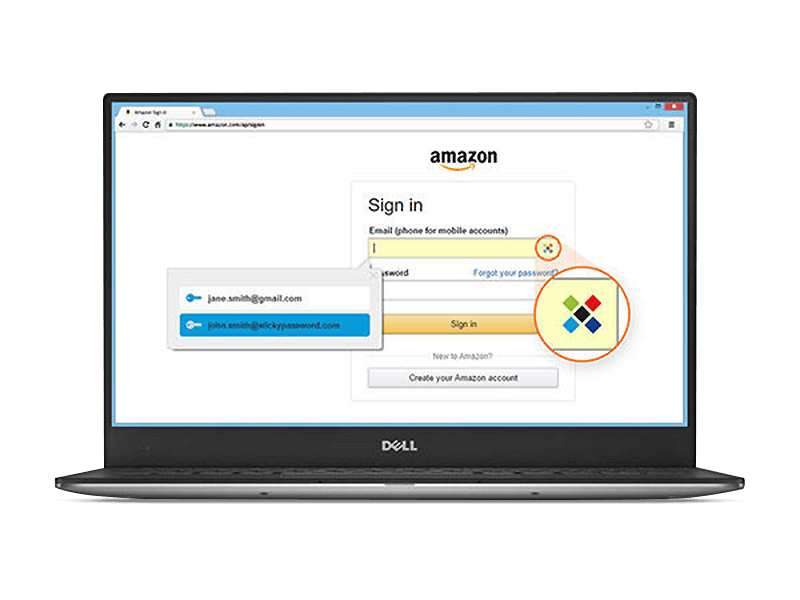
Without strong passwords there can be no security on the internet! The more complex they are, the harder they are to crack. But who can honestly remember all of them anymore? How can you manage highly secure passwords for dozens of different services? Sticky Password creates and manages super-strong passwords for you. All you need to remember is your master password and the program handles the rest - with maximum encryption. Use Sticky Password and turn a hacker's worst nightmare into a reality!
Passkeys – secure login without a password
With Passkeys, you can log in faster, easier, and more securely – completely password-free. Verify your identity directly on your device using a fingerprint, face recognition, or PIN. Modern technology keeps you safe: each login uses a unique key pair, with your private key stored securely on your device while the public key stays with the service. Phishing, data theft, and weak passwords have no chance. The result: one-click login, maximum security, and full flexibility – you can use Passkeys alongside your existing passwords and be ready for the future of authentication.
Benefits at a glance
 Generates extra-strong new passwords, whenever you need them
 AES‑256 encryption the world’s leading standard also used by the military
 Works on your PC, Mac, Android / iOS tablets and smartphones
 Stores credit card numbers for express checkout
 Optional synchronization via local Wi‑Fi – your encrypted data never leaves your devices
 Excellent browser support: 16 browsers on all 4 major platforms
Saves time every day
Instead of dozens of passwords, remember just one. Everything else is automatically filled in by the password manager.
Absolutely secure
AES‑256 – the world’s leading encryption standard. Optional synchronization via local Wi‑Fi – your encrypted data never leaves your devices. Biometric authentication.
You and only you will know your master password!
We'll neither store your password on our servers nor will we send it over the internet. By default, it will also not be stored on your devices. It will only exist in your head.
The hackers’ nightmare: AES‑256
The data encryption used in Sticky Password is based on the world’s leading encryption standard AES‑256 – the same data encryption used by military and government organizations.
Offline data sync – via local Wi‑Fi or manually
One of the optional benefits of Sticky Password: you don’t have to synchronize only via our cloud servers. The synchronization can be made over local Wi‑Fi or manually – your encrypted data never leaves your devices.
Fingerprint Scanning
No other password manager offers more in terms of biometric support of fingerprint scanning than Sticky Password.
Identity verification of the account holder can be made with just one swipe of a finger. We support fingerprint authentication on iOS and Android phones and tablets that are equipped with fingerprint scanners. This includes Touch ID on iPhones and iPads, and the Samsung Galaxy and other Android devices.
Two-Factor Authentication
Increase the security of your data by enabling Two-Factor Authentication (2FA). When activated, you’ll be prompted to enter an additional unique security Code after entering your Master Password each time you unlock your database.
Passkeys—the secure password alternative
Passkeys enable modern, passwordless authentication and replace traditional passwords with secure digital keys. Signing in is simple and convenient using your fingerprint, facial recognition, or PIN — no complicated typing required. Sticky Password supports passkeys and securely encrypts and manages them, making your login even easier while keeping it just as secure as ever.
| Only one password to remember | |
| Save time: Fill out forms instantly | |
| Log In automatically | |
| Manage web accounts | |
| Integrated password generator | |
| Manage app accounts | |
| Create encrypted identities | |
| Create encrypted memos | |
| Virtual keyboard | |
| Prevent identity theft and protect your ID | |
| Create encrypted backups | |
| Military-grade AES industry-leading password encryption | |
| Passwords always at hand on your USB flash drive |
Practical backup
Cloud backup preserves several previous versions of your password database for you
Works across devices
Run Sticky Password on your tablet, your computer and your smartphone. Sync through our cloud server, your local Wi-Fi network or manually.
 |
 |
What customers think about Sticky Password Premium
Only customers who have purchased or registered a specific product can rate that product.
This way you can be certain that all opinions are genuine and verified.
-
Remi DuhartBest password protection software Meilleur logiciel de protection des mots de passe
Excellent
Useful
Unbeatable
Thank you
Excellent
Utile
Incomparabe
Merci
This review has been automatically translated.Helpful? -
Péter GázsityPassword Reminder Jelszó emlékeztető
The product is excellent, but one drawback is that it doesn't support Hungarian, which detracts from the user experience.
A termék kíváló,de van egy hátránya,hogy nem tudja a mayar nyelvet ez rontja a felhasználó élményét.
This review has been automatically translated.Helpful? -
Wolfgang KniehaseExcellent Ausgezeichnet
Easy to understand and well-organized; easy to use even for beginners
leicht verständlich und übersichtlich auch für Laien gut zu gebrauchen
This review has been automatically translated.Helpful? -
Josef Fuchs1A 1A
It's one of the best tools for me and I've been using it for a long time. I've never had any problems with this before. Takes a lot of work and time off you. Top product.
Für mich eins der besten Tools und ich verwende es schon länger. Hatte noch nie Probleme damit. Nimmt einen viel Arbeit und Zeit ab. Top Produkt.
This review has been automatically translated.Helpful? -
Markus BräutigamTool class Klasse Tool
I like to use Sticky because it's impossible to know everything by heart with over 100 accesses.
It is also much easier and safer to regularly update relevant (important) accounts with Sticky.
I find the option of NOT having to upload to a cloud and the manual synchronization option via WLAN really great.
Of course, you have to bring the databases up to date again and again, but it's worth it if I don't have to give out my passwords “out of hand”.
It is also great that all devices (whether PC, tablet or smartphone) can use the same program and the same database!
A paper solution (file box) may also be completely secure (depending on where it is stored), but encourages you to regularly renew passwords.
Sticky's clue is also really great if you have used passwords (formerly, perhaps unknowingly) several times.
This allows you to fix this in a very specific way.
Ich verwende Sticky sehr gerne weil es bei meinen über 100 Zugängen unmöglich ist das alles auswendig zu wissen.
Auch die regelmäßige Erneuerung der relevanten (wichtigen) Zugänge ist mit Sticky viel leichter und sicherer.
Ganz prima finde ich die Möglichkeit NICHT in eine Cloud hochladen zu müssen und die manuelle Syncronisationsmöglichkeit via W-LAN.
Natürlich muss man dann immer wieder einmal die Datenbanken auf den gleichen Stand bringen, aber das ist es mir wert, wenn ich dafür meine Passwörter nicht "aus der Hand" geben muss.
Super ist auch dass alle Geräte (egal ob PC, Tablet oder Smartphone) das gleiche Programm und die gleiche Datenbank verwenden können!
Eine Papierlösung (Karteikasten) ist vielleicht auch ganz sicher (je nachdem wo er aufbewahrt wird) , verleitet einem aber die regelmäßige Erneuerung der Passwörter.
Ganz toll ist auch der Hinweis von Sticky, wenn man Passwörter (früher, vielleicht auch unwissentlich) mehrfach verwendet hat.
Damit kann man das ganz ganz gezielt beheben.
This review has been automatically translated.Helpful?

More top products from Ashampoo: No PC should be without them!





The ultimate fix for malware infections, hard disk defects and Windows crashes